ComfyUI PNG Workflow Metadata: Extract, Import, and Privacy
ComfyUI embeds full workflow JSON in PNG metadata — often compressed. Wavemaker extracts it client-side, transpiles intent, and never uploads your image bytes. Other tools' PNG formats are not supported.

ComfyUI PNG workflow metadata embeds the full graph in image files — so a screenshot can be a portable recipe. Wavemaker reads that metadata in your browser, transpiles intent, and does not upload image bytes for extraction. This is import, not Comfy execution. See /comfyui and import ComfyUI workflows.
Why do Comfy PNGs carry workflows?
ComfyUI’s default save path writes:
- Pixel data (what you see)
- Metadata chunks (
tEXt,iTXt, etc.) containing workflow JSON - Sometimes compression (zlib) to fit large graphs
Community sharing often passes PNGs in Discord or galleries — recipients drag the same file back into Comfy to queue identical topology. That convenience created an informal distribution format parallel to .json.
What is inside the metadata?
Conceptually the same information as a UI or API export:
- Node list and links (serialization varies by Comfy version)
- Widget values (prompts, seeds, strengths — strength survives in JSON but sampler knobs drop on transpile)
- References to checkpoints and LoRA filenames
The importer treats recovered JSON identically to uploaded .json — normalize → intent → map → report.
How do compressed payloads behave in the wild?
Large graphs exceed comfortable chunk sizes, so Comfy sometimes zlib-wraps workflow JSON inside PNG text metadata. The browser path detects compression flags and inflates with DecompressionStream before parsing. If inflation fails, you see a explicit error — not a partial spec with missing LoRAs. Corrupted downloads from chat apps that re-encode images are a common root cause; ask collaborators to send the original Comfy save or parallel API JSON when metadata is truncated.
Teaching teams to keep JSON as source of truth and PNG as handoff convenience prevents archival pain. Product workflows earning revenue should live in git as API JSON with Hub slug versioning; PNG imports are excellent for Discord-era recipes but poor as the only artifact.
How does client-side extraction work?
High-level steps in the browser:
- Read file as bytes; parse PNG signature and chunks
- Find workflow-related text keys Comfy uses (including compressed payloads)
- Inflate via
DecompressionStreamwhen zlib-wrapped - Parse JSON; POST JSON only to import endpoint
Your pixels never leave the machine for extraction — useful for confidential boards. After JSON arrives server-side, normal transpile rules apply: no custom nodes executed, ControlNet not imported, etc. — why transpile.
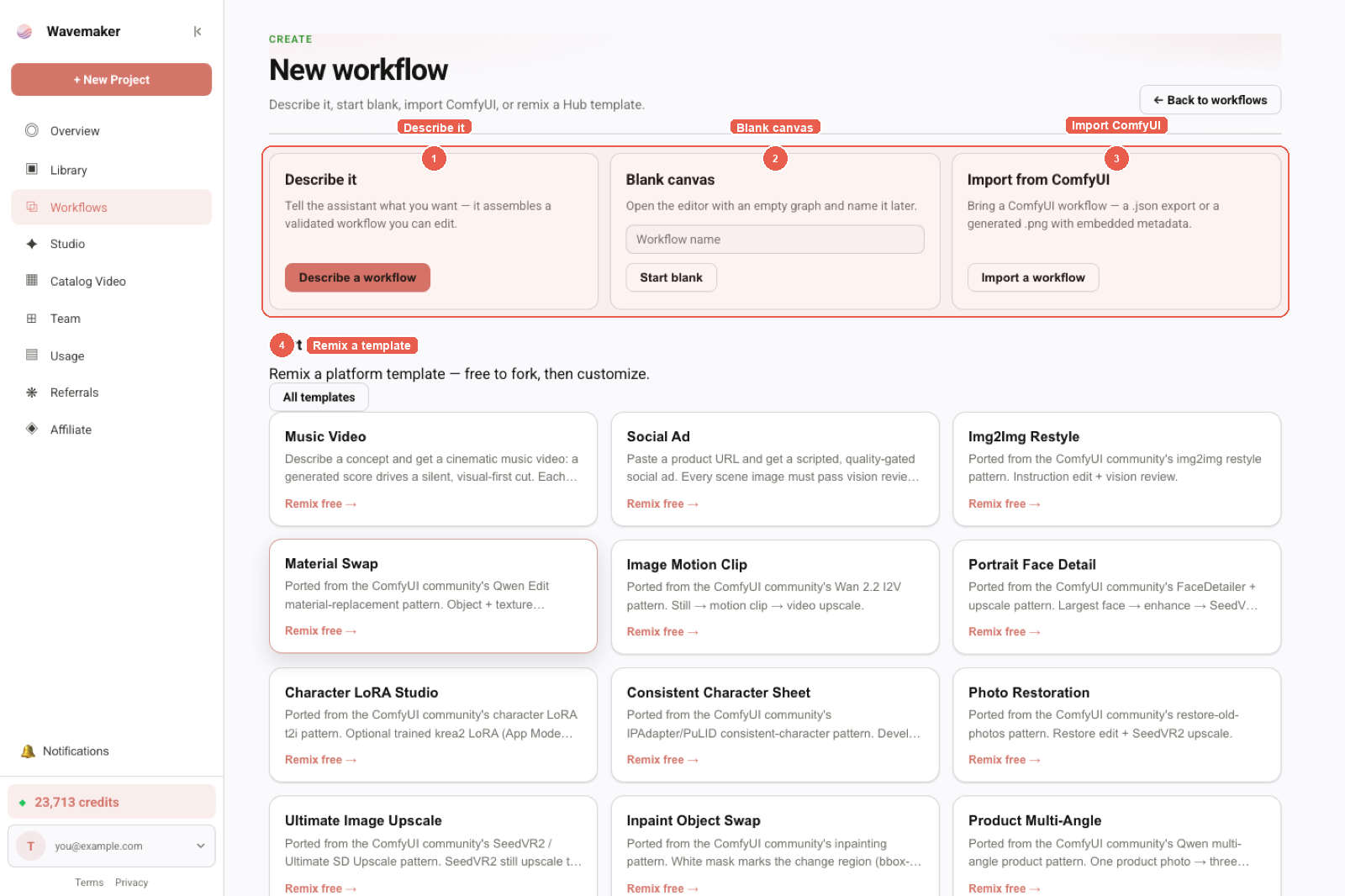
New workflow entry: describe, blank canvas, Import from ComfyUI, or remix a template.
PNG vs JSON — when to use which?
| Channel | Prefer |
|---|---|
You have the .json | JSON — smaller, clearer diffs |
| You only have an old output PNG | PNG import |
| Teaching non-technical users | PNG drag-drop familiarity |
| CI/automation | API JSON, not PNG |
Format internals: ComfyUI JSON formats.
Privacy and leakage considerations
PNG metadata is steganography for graphs:
- Re-uploading PNGs to social platforms may strip metadata — recipe lost, pixels remain
- Keeping metadata means prompts travel with the image — scrub before public sharing if needed
- Wavemaker extraction is local, but publishing exposes promoted inputs — use Premium hide graph — Comfy to product
Common PNG import errors
| Error class | Meaning |
|---|---|
| Not a PNG | Wrong file type |
| No embedded workflow | Comfy did not save metadata, or platform stripped it |
| Wrong tool format | A1111 / other embed — use Comfy export |
| Invalid JSON after inflate | Corrupt download — re-save from Comfy |
More: workflow troubleshooting.
Can social platforms strip metadata without warning?
Yes — Instagram, X, and some CDNs re-encode uploads and drop text chunks. If your distribution chain includes social, treat PNG as convenience, not archival. Keep canonical API JSON in git for anything you publish to Hub or API. PNG import is best for one-hop handoffs where you trust the file came directly from Comfy save, not from a screenshot pipeline.
How does PNG import differ from uploading JSON?
File upload for .json sends the graph directly — no chunk parsing. PNG import adds a client-side decode step that must succeed before the same transpile pipeline runs. Errors therefore split into extraction failures (missing chunks, wrong tool format, corrupt zlib) versus import failures (unsupported nodes, compile diagnostics). Support teams should identify which phase failed before blaming the mapper.
Once JSON is recovered, behavior matches file JSON import: dropped sampler settings, ControlNet and custom nodes listed as not imported, LoRA entries in unresolved assets when filenames are missing, and copilot prefilled from report residue. When PNG and API exports should match but reports diverge, suspect an older embedded save or a re-encoded image with partial metadata — re-save from Comfy or attach parallel JSON. Full contract: /comfyui.
After PNG import — online run path
Recovered graphs become platform blocks — run ComfyUI workflows online. LoRA filenames in metadata still require library binding — LoRA workflows.
More: workflow troubleshooting.
How should creators document unsupported Comfy features for runners?
Hub descriptions should mention when imports replaced ControlNet with review gates, or when video sections replaced in-Comfy AnimateDiff chains with platform video blocks. Runners less familiar with Comfy jargon still understand “upload reference, approve still, then animate” as a numbered list. Premium hidden graphs hide prompts but should not hide input requirements — aspect enums, required reference uploads, and max batch sizes belong in the spec panel and marketing copy.
Forensics: verifying metadata without importing
Open PNG in tools that show text chunks if you need to debug before upload. If chunks are missing, no online importer can recover intent — export JSON from the original Comfy session. Teaching creators to keep both PNG and JSON artifacts reduces support load.
Developer note
Recovered JSON can be sent to POST /api/v1/workflows/comfy-import from your tools if you extract offline — response includes spec, report, diagnostics without persisting.
Educate collaborators: forwarding PNGs forwards recipes unless metadata was stripped.
Checklist: PNG handoffs between teams
- Confirm file saved from Comfy, not re-encoded by chat app
- Prefer parallel
.jsonarchive for long-lived products - Import locally in browser before sharing externally if privacy matters
- Read dropped sampler lines even when PNG embed shows seeds
- Publish via Hub when ready — do not rely on PNG as DRM
Why client-side extraction matters for compliance
Data-processing agreements sometimes ask where user imagery goes. For PNG import, extraction localizes sensitive bytes to the user’s browser; only graph JSON crosses the wire. That is different from uploading full PNGs to a hosted Comfy worker for parsing. Document this distinction for enterprise buyers comparing vendors.
PNG metadata import is the fastest handoff between Discord collaborators, but product teams should still canonicalize JSON in git for anything that earns revenue.
Conference speakers demoing “drag PNG to cloud” should show the import report on the next slide — audiences remember honesty about dropped seeds more than a single hero render. That presentation habit reduces post-talk support DMs asking why online output differs.
If metadata is stripped, do not blame the importer — re-save from Comfy or attach API JSON. Support macros should say that explicitly to set empathy and direction in one reply.
Add a Hub FAQ entry “Do you upload my PNG?” linking to this post — enterprise runners ask every week during Comfy migration pilots.
Metadata extraction errors spike when users drag screenshots instead of direct Comfy saves — teach “Save” not “Export frame” in onboarding copy.
For workshops, print a one-page flow: PNG in browser → report → copilot → quote → run — participants follow along faster than reading Comfy desktop docs.
Security reviewers comparing vendors should ask where PNG bytes go — Wavemaker’s answer is local extraction, then JSON-only transpile, documented on /comfyui.
If your pipeline strips EXIF/PNG text for privacy, keep a parallel JSON archive — otherwise online import cannot recover intent later.
Archive JSON next to PNG in DAM tools — future you will import faster than re-building graphs from screenshots alone.
Treat PNG imports as convenience and JSON as source of truth — same policy as software teams keeping binaries and git in sync.
When legal asks for data flow diagrams, include browser-side PNG parsing as a separate box from server-side transpile — reviewers appreciate the split. Link /comfyui in the diagram footnote for procurement packets, security reviews, onboarding slides, partner enablement kits, internal wiki stubs, and customer-facing FAQs. Keep this post linked from PNG import tooltips in onboarding.
Where to go next
- Hands-on import: Import ComfyUI workflows
- img2img from PNG recipes: img2img online
- Alternatives context: Web-based Comfy alternatives
- Pillar: /comfyui
Treat Comfy PNGs as recipe containers, not just thumbnails — and treat Wavemaker import as honest transpile, not a hosted Comfy queue.
Frequently asked questions
- Does ComfyUI store the workflow inside every PNG?
- ComfyUI saves workflow JSON into PNG text chunks (sometimes zlib-compressed) alongside the image. That is why sharing a PNG can share the recipe — not just pixels.
- Does Wavemaker upload my PNG to extract the workflow?
- No. Extraction runs in your browser: read PNG chunks, decompress if needed, send only the recovered JSON to the server for transpile.
- Can I import Automatic1111 PNG parameters?
- No — A1111 uses a different parameter embedding. You will get an explicit format error; export Comfy JSON instead.
- Will PNG import preserve seed and sampler settings?
- The embedded JSON includes those fields, but Wavemaker lists sampler, seed, CFG, and steps as dropped settings after transpile — same as JSON import.